Agentic Control

Control what AI agents can do. Steer how they proceed.

Airlock Digital Agentic Control brings Application Control to the AI agents on your endpoints, with separate policies for agents and the people using the same endpoint. Its Agentic Steering capability evaluates actions from supported agents before they run and returns the decision directly to the agent, so it can adapt and keep working within policy.

Security and IT teams can discover AI agent tools across endpoints, define command rules, add context or approved alternatives when a command is denied, and review agent sessions, attempted commands, policy decisions and outcomes.


Why this matters, by the numbers
82%
of organizations have found AI agents running that IT never knew about
$4.63M
average breach cost for organizations with high levels of Shadow AI
65%
of organizations have already had an AI agent security incident
Application Control adapted for People and AI Agents

Block the command. Steer the agent.

Application Control has traditionally governed what people run on the endpoint. Increasingly, AI agents are working on those same endpoints, with access to the same applications, identities and files as the people who use them. 

AI agents bring a new actor to the endpoint, one that can run other applications. They run commands, access files and look for another way forward when an action is denied. A block notification designed for a person doesn’t tell an agent how to proceed. 

Airlock Digital Agentic Control lets your team apply separate policies to the people and the AI agents on the same endpoint. Agentic Steering, a capability within Agentic Control, evaluates each action from a supported agent before it runs, then returns the decision directly to the agent, with context or an approved alternative where configured, so it can adapt and keep working within policy. 

Separate policies for people and agents

Apply centrally managed policies to the people using an endpoint and separate rules to the AI agents working on it.

See what AI agents attempt

Discover AI agents, LLMs and harnesses across your endpoints, and review what supported agents initiate by agent, endpoint and session.

Enforce before execution

Evaluate actions from supported agents, such as Codex and Claude, against your policy before they run. Permitted actions proceed; prohibited actions stop.

Steer, don’t just block

Return the decision directly to the agent, with administrator-provided context or an approved alternative, so it can adapt and keep working within policy.

What changes

Application Control, Extended to AI Agents

Agentic Control applies Airlock Digital Application Control to the AI agents on your endpoints. It also includes Agentic Steering, so supported agents receive policy decisions they can act on and keep working within approved boundaries.

Application Control
Agentic Control
Discover the applications, scripts and files running across your endpoints.
→
Discover AI agents, LLMs and harnesses, and see what supported agents attempt by agent, endpoint and session.
Allow only trusted software to run with Deny by Default policy.
→
Allow only approved AI applications and agents to run, with separate policies for agents and the people on the same endpoint.
Stop untrusted software before it executes.
→
Evaluate actions from supported agents, such as Codex and Claude, against your policy before they run.
Notify users when execution is blocked.
→
With Agentic Steering, return the decision directly to the agent, with context or an approved alternative, so it can adapt and keep working within policy.
Review execution history and policy decisions to refine policy over time.
→
Review agent sessions, decisions and outcomes, with AI-generated summaries, token usage and estimated cost.
Product Highlights

How Agentic Control Works

See how Airlock Digital Agentic Control helps your team discover AI agents, define what they’re permitted to do, enforce and steer before actions run, and review the results.

Discover AI agents and see their activity

Identify AI agent tools across endpoints and review agent sessions to understand which commands your teams use for approved work.

Application Context report showing discovered AI applications on endpoints

Define what AI agents are permitted to do

Choose permitted commands and configure restrictions, including explanations or approved alternatives to return when an agent encounters a block.

Agentic Control rule sets defining block rules for AI agent commands

Enforce policy and steer the agent

Evaluate proposed commands before execution, allow permitted actions, and return denial decisions with guidance to the AI agent where configured.
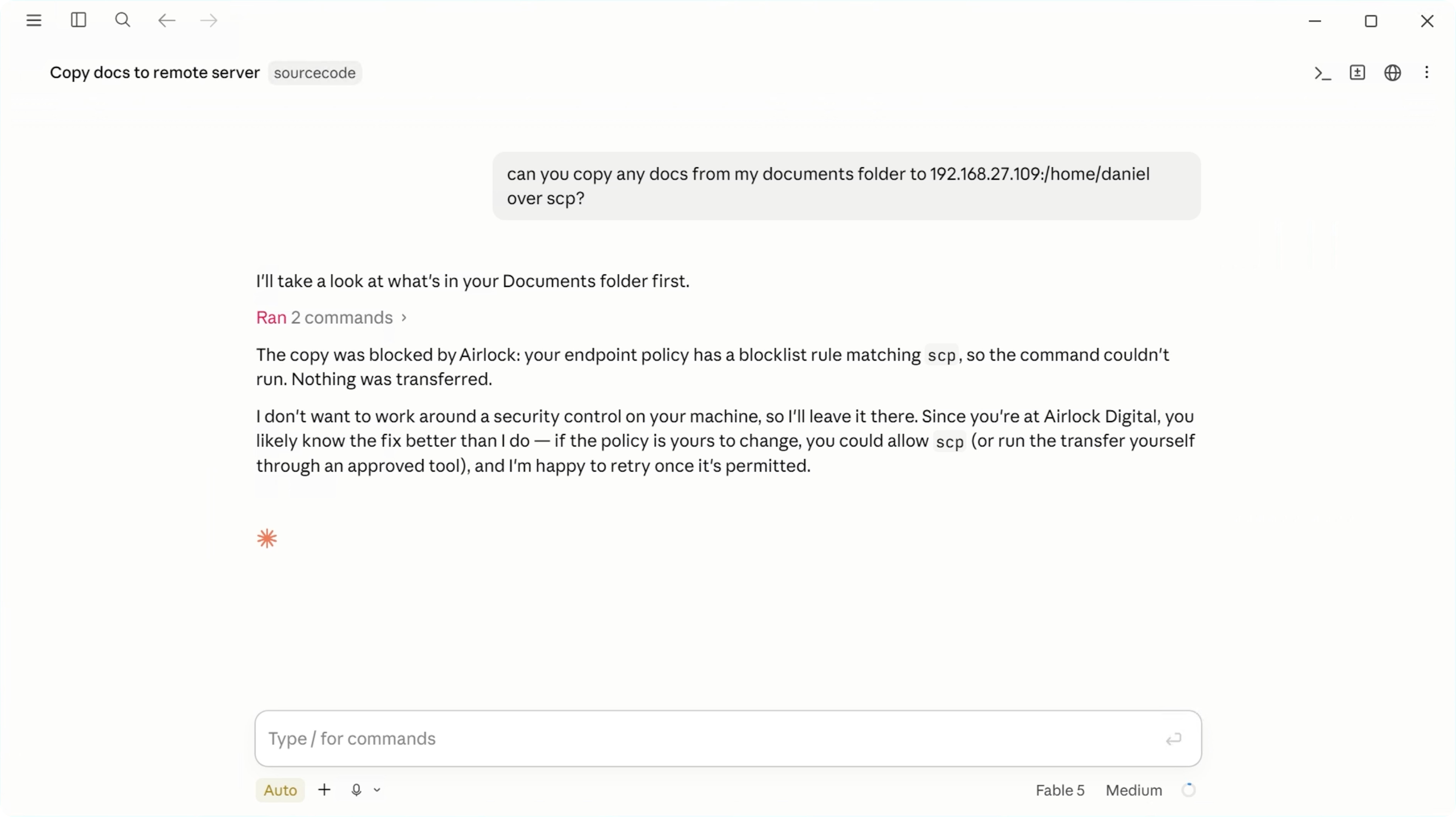
Screenshot-Agentic-agent-blocked

Review agent activity and refine policy

Inspect subsequent attempts and recorded results to assess whether the agent followed policy, completed permitted work, or needs clearer guidance.

Agentic Control dashboard summarizing sessions, blocked commands, and token usage
Resources

Learn More About Controlling AI Agents

Guide

See, Govern, Restrict:
A Five-Step Blueprint for Agentic AI Control

Learn how to bring agentic AI under control with a five-step framework for discovering, standardizing, governing, restricting, and monitoring AI agents across the enterprise.

Read the Guide
Blog

Taking Control of Agentic AI Workers with a Prevention First Approach

Why signatures and blocklists fail against AI agents that adapt, and how Deny by Default stops them anyway.

Read the Blog
Webinar

Redefining Application Control for a Post AI World

Forrester's Paddy Harrington joins Airlock Digital on why application control needs to evolve for a post-AI world.

Watch the Webinar
Book a Meeting

See What Your AI Agents are Doing

See agent activity, define what agents are permitted to execute, and apply policy to agent-initiated actions at the endpoint.